Attention is the expensive part. Most of it leaks.

It arrives whether or not anything is ready to catch it, and whatever the page and the follow-up miss runs straight back out.
Getting someone to click is the bit you pay for, in ad spend, in the time you spent posting, in the favour you called in for the referral. What happens in the ten seconds after the click decides whether any of it was worth it. A Facebook page, a home page about your whole business, or a site that asks them to go hunting for the thing they came for: all three lose people who were ready.
What follows is about where people leave, not how many. There are no figures on it, because yours would be yours. A Presence Page attacks the middle step by removing it.
A landing page is a different craft from a website.
A website introduces a business to someone who already went looking for it. A landing page has to convince a stranger who was scrolling a minute ago and has one thumb and no patience.
So this is the part I actually study: the method your page gets built on, with the real names for it, so you can ask why any of it is there.
They see what they clicked for, in the first line.
Whatever the ad promised is the first line on the page, in the same language, because the visitor’s first question is am I in the right place, and a generic welcome does not answer it.
- Same words, not a paraphrase. The most common thing missing on the pages I audit.
- A result, not an identity. “Blocked drain cleared today”, not “Welcome to our plumbing business”.
- A timeframe where the job allows it. An outcome you can picture on a calendar beats an adjective.
Get this wrong and the click is gone in the first second, before a word of your offer has been read.
Anything a competitor could say comes off.
Every photo, testimonial and line of copy is held against one question: could the business down the road use this unchanged? If yes, it does no work, so it goes.
- Stock photography fails it. So does most “quality workmanship, competitive prices” copy.
- One page, one action. The navigation comes off: every other link is a way out of a page you paid for.
- The phone number stays. That is the other half of the conversion, not a distraction.
What survives both tests is the specific thing only you can say, next to the only thing you want them to do.
Becoming a customer is made as easy as it can be.
Field count is a trade-off against your lead economics, not a rule, and whatever you ask for, the reassurance has to sit where the decision is actually made.
- Past about seven fields, stage it. Easy qualifying questions first, contact details last.
- Proof at the button, not the footer. Licence, insurance, years in trade, a real review.
- Answer the actual fear. For trades that is usually quote inflation, so the answer is a fixed quote with no surprises.
Triage cheaply by phone and you want volume, so ask less. If your calendar is the scarce thing, one qualifying question earns its place.
The whole decision fits on screen one.
Nielsen Norman Group’s 2018 eye-tracking research found roughly 57% of viewing time goes above the fold and about 74% within the first two screenfuls. People do scroll, but attention is a resource you spend, and most of it is spent early.
- Six slots, in this order. Headline, subhead, proof twice, one action, the fear remover, the trust strip.
- Length is set by traffic temperature. Warm search traffic can stop early; cold Meta traffic needs the problem named, the process, real work, the objections.
- The last screen repeats the first. Headline, form again, phone. Nobody should scroll back up to act.
Which length you get is a decision we make from where your traffic comes from, not from a template.
Nothing is on your page by accident, and you can ask me why any of it is there.
Then it stops being general and starts being yours.
Everything above is method, and method is built on what works generally. The people your ads actually reach are a particular set of people with their own reasons for hesitating, and none of that is in the method. Testing is how the page stops running on theory and starts running on them.
- 01
We pick the question worth asking
The headline, the offer, the form, what sits above the fold. One at a time, starting with whichever is most likely to be costing you.
- 02
I build the second version and split the traffic
A real second page, not a toggle, with your ad traffic divided between the two and the conversion tracking already wired from the build.
- 03
I read it and call the winner
The winner stays live and becomes the new version to beat. You get told what changed and why it won, in plain words.
- 04
Then the next question
The page keeps moving toward the customers you actually get, rather than sitting exactly as it launched.
This only works with enough traffic to tell a real difference from a quiet week. If your ads are not sending that yet, I will say so rather than run a test that tells us nothing, and we spend the money on the ads instead.
Same traffic, same offer, two versions of the page. One led with a video, the other put the form first.
GA4, 1 May to 4 Aug 2026, split by the test’s own assignment event. My own campaign, not a client’s, and the traffic did not split evenly (231 against 136). It is what happened on one page in one market, which is exactly why yours gets tested rather than assumed.
Testing is a $100 a month add-on to the Engine rather than part of the one-off build, because it is ongoing work rather than something finished at launch. One test runs at a time, it runs until the answer is clear or three weeks have passed, and the winner is the version that stays live. It needs about 300 visits a month to the page being tested. Below that, the two versions cannot be told apart and the result would be noise.
The whole list.
This is everything the build includes, grouped the way the work actually happens. If something you need isn’t here, ask: it’s either quoted before we start or it belongs in a different piece of work, and we’ll tell you which.
The page
- One custom conversion page, designed to match your brandHand-built in code, not assembled from a template.
- The copy written for you, one offer and one clear call to actionYou don’t have to supply the words. We write them and you approve them.
- Mobile-first, and fast: 95+ mobile PageSpeed at launchBuilt at phone width first, because that’s where the clicks come from.
The wiring
The page catches the enquiry. What happens in the next five minutes is what decides whether it turns into work, and that is a different job, done by the Presence Engine. These are the parts of it the build itself puts in place.
- Lead-capture form and click-to-call, wired into the same follow-up a full build uses
- Missed-call text-back wired inThe build wires it; it runs on the Presence Engine, which provides the tracked number it needs. Without that pairing there’s nothing for it to run on, so we say so rather than list it as free with every build.
- Conversion tracking set up for your ad platformSo the platform learns what a real enquiry looks like, and you can tell which ads earn.
- Booking calendar and reminders wired to the pageThe build points the page at it; it runs on the Presence Engine. If you already use your own booking or practice software, we link the page straight to it and leave it alone.
- Follow-up messages in your brand, not a generic noticeConfirmations and reminders in your logo, colours and voice, from your own sending domain. Built on the Engine, and only where we install the booking; a link to your own software keeps that software’s own messages.
- Ready for A/B testing once it is earningThe page is built so a headline or offer can be tested properly later. Testing itself is a $100/mo Engine add-on, and we only run it once the page clears 300 relevant visits a month, because below that a result cannot be read honestly.
The terms
- The same testing and ownership terms as a full buildEvery form test-submitted and confirmed before launch, phone numbers tapped on a real phone, and the page and its code are yours on final payment.
The same list, laid out on the page itself. Everything above the fold earns its place, and everything below it exists for the people who want more before they commit.
- 01
One thing to read
The offer from the ad, in the ad’s words.
- 02
One thing to do
A single action, repeated down the page.
What that looks like on the page
- 03
Enough to believe it
Proof next to the button, not in the footer.
- 04
Phone width first
Where the paid clicks actually arrive.
The machine behind the page.
The page catches the enquiry. What happens in the hours after it (the reply, the reminder, the follow-up nobody had time to send) is the Presence Engine, and it is the difference between a lead and a booked job.
A click you already paid for, turned into booked work.
- They tap the adand land on the page
- They enquirea call or the form
- Followed upuntil they answer
- Booked inwon work
The page does the first step. Everything from the enquiry onwards is the plan, which is why the two are sold together rather than the page on its own.
The point of the page is a booked week.
A page that catches enquiries and a diary that fills are not the same thing; what closes the gap is what happens in the minutes after someone taps the button. On the plan, missed calls get texted back and the follow-up keeps going until someone answers. If you already run booking software, we point the page at it and leave it alone; if you don’t, the Presence Engine sets one up in your name so people book themselves in while you’re on a job.
Work only lands when you happened to be free to pick up.
People book while you’re on a job, and reminders go out by text on their own.
A visual illustration of how bookings arrive, not client data. The number of days shown is set to make the mechanisms readable, and is not a projection of what you would get.
What the person who enquired actually gets.
All of this is the plan, not the build: the page hands the enquiry over and the Presence Engine runs everything below. (Already running your own booking software? The page points at it and leaves it alone, and this part isn’t yours.)
A page, a follow-up chain, and the ads pointed at it.
BaseAim, a B2B agency selling to accounting firms. One offer, one page built to catch it, a thank-you page with a video, a call-prep page before the meeting, and branded emails between each step. Then Meta ads pointed at the whole thing.
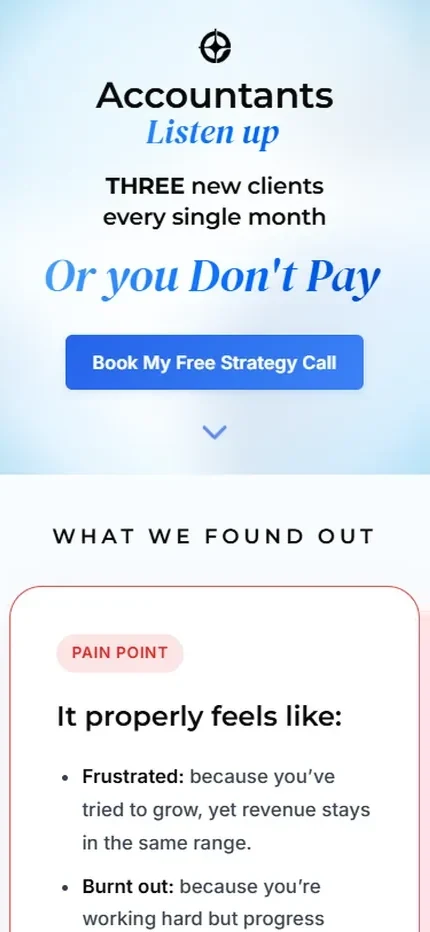
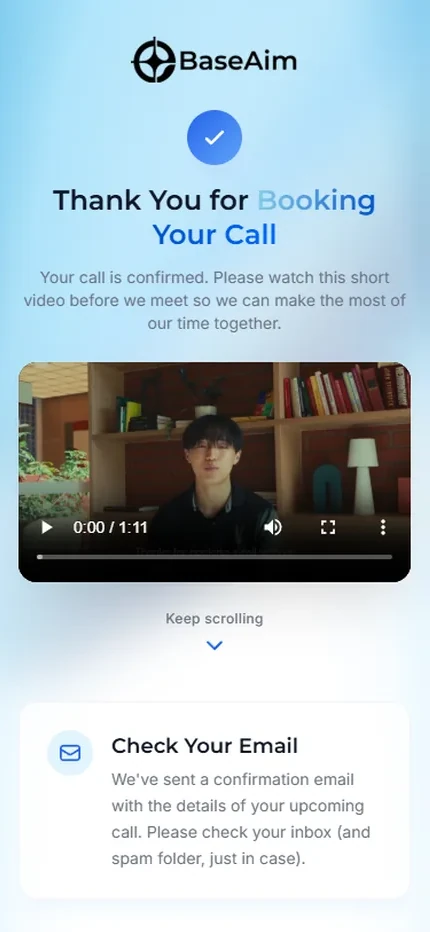
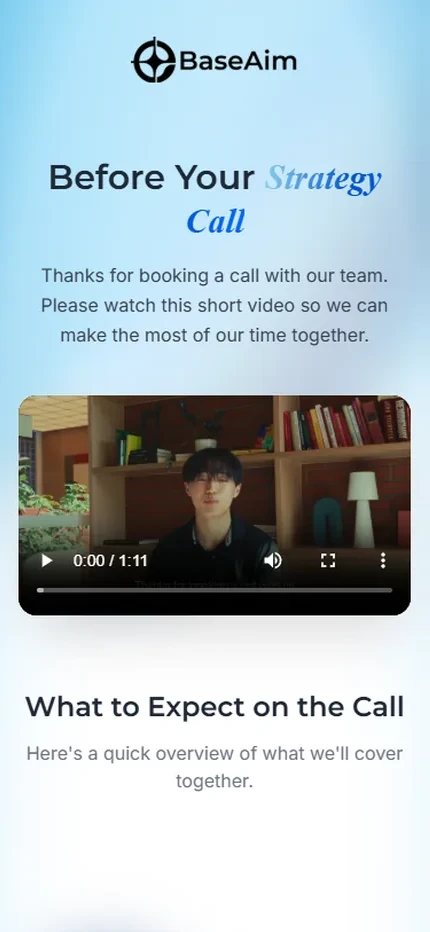
This is the whole shape the Presence Page is sold in: the page catches the enquiry, and everything after it (the confirmation, the video, the reminders, the prep) is the plan doing its job while nobody watches.
per booked call. 22 calls booked from $613 of ad spend on the best-performing ad.
of landing page views booked a call, 22 from 163, on that same ad.
what one of their clients is worth to them, over about two years. The page that brings those clients in is a one-off $1,000 to $2,000.
The first two figures come from the Meta Ads Manager export for that account, one ad, 24 Oct 2025 to 9 Jun 2026, in AUD. “Landing page views” is Meta’s own metric. This is our own campaign, not a client’s, and one ad in one account. The $50,000 is BaseAim’s own figure for what one of their clients is worth to them, reported by them: their setup fee plus their monthly, held for about two years, taken at the lower end of the range they gave. All of it is what happened, not what will happen for you.
The difference is what it’s built to do.
There are five ways to get a page at the end of an ad. They are not the same, and the differences only show up once the traffic is running.
Every row above is about the page itself, not the ads pointing at it; running those is a separate service and a separate conversation.
This isn’t the cheap version of the other one.
They solve different problems. If you want the full site, buy the full site: a Presence Page won’t grow into one, and we’d rather say that here than let you find out later.
The Presence Page
$1,000 to $2,000 one-time
- You’re running ads, or about to, and they point somewhere that doesn’t close
- You’re pushing one offer, service or promotion rather than everything you do
- You want to find out whether the funnel works before committing to a site
- You have no website at all and need something real to send people to now
The Presence System
$3,500 to $6,000 one-time
- People search your business by name and need to find a real site
- You have several services that each deserve their own page
- You want to be found in local search, not only paid for
- The site is the front of the business, not one campaign’s landing spot
Plenty of people start with the page and build the site later, once the funnel is earning. That’s a good order to do it in, and nothing about the page is wasted when the site arrives.
One page still needs four different jobs.
It is one page, so it is smaller than a whole site, but it is not simpler. The same four trades have to touch it, and the page only works if all four are done well.
A web designer
Decides how the page looks, and how it feels to use on a phone.
$80,000 to $85,0001a yearA front-end developer
Actually builds it, and makes it load fast instead of slow.
$105,000 to $125,0001a yearA copywriter
Writes it so it sounds like you and asks for the job.
$75,000 to $95,0001a yearAn automation specialist
Wires up the enquiry, the follow-up and the reporting.
About $98,0002a year
Those are base salaries, before you add 12% super3. It isn’t a shopping list; it is how wide the skill is. Most local businesses can’t hire even one of them, and a single page is not worth hiring four.
In every page
-
One page, built for one decision
$1,000 to $2,000one-off, half to start- Custom-built to match your brand, not a template
- The copy written for you: one offer, one call to action
- Lead-capture form and tap-to-call wired in while it is built
- Conversion tracking set up for your ad platform
- Built at phone width first, and fast: 95+ mobile PageSpeed at launch
- Yours on the final payment, the page and the code
- Not a website. If people search your business by name and need a real site, that is the Presence System.
Already running your own booking or practice software? We link to it and leave it alone; we don’t touch it. The branded confirmations are part of the booking we set up ourselves.
Before you pay the balance
You see the real page, working, before you pay the second half. If you still don’t want it, you don’t pay the balance and you don’t take the page.
What you have picked: the page at $1,000 to $2,000 once, then $400$100 a month.
A live page has to be hosted and looked after by someone, so one of the two plans starts at launch and runs on from there. Which one is your call, and you can move between them.
Prices exclude GST. Nothing is charged until your exact number is agreed with you in writing and you say yes.
Want the actual number for your one page?
Tell us the offer you’re running and where the traffic comes from, and you’ll get a real quote and a straight answer on whether this is even the right thing to buy.
- 1. Average base salary in Australia, seek.com.au, retrieved 29 Jul 2026: web designer $80,000 to $85,000; front-end developer $105,000 to $125,000; copywriter (marketing) $75,000 to $95,000.
- 2. Marketing automation specialist, about $98,000 average base salary in Australia: glassdoor.com.au, retrieved 29 Jul 2026. SEEK does not publish a salary page for this role.
- 3. Superannuation guarantee is 12% of ordinary earnings from 1 July 2025 (ato.gov.au), paid by the employer on top of salary.
Why I’ll build one page properly.
A single page gets treated as the small job. It gets a template, an afternoon, and whatever copy was lying around, and then it carries every dollar of someone’s ad spend.
That never made sense to me. The page at the end of an ad is doing the hardest part of the whole funnel: it has about ten seconds to answer who you are, whether you do the thing, and how to get you. If it fumbles that, the ad money is already spent.
So I build it the same way I build everything else. Hand-written code, your words rather than filler, and the person who builds it is the person you talk to. It is a smaller job than a full site. It is not a lesser one.
I’ve spent a lot of time studying pages like this specifically, because they are a different craft from a website. A website introduces you: who you are, what you do, that you’re real. A page like this has one job: make someone decide, on the spot, while they are still holding their phone. What goes on it, what comes off it, what order it’s in and what the button says are all decisions, and they are the difference between a page that looks nice and a page that converts.
That’s what I’m building for. Not a prettier version of what you have, but a page built to turn the traffic you are already paying for into someone getting in touch.
Eden
Founder, Ryder Digital
Owner-built, AustraliaWhat we won’t promise you.
The honest limits first, then the honest fit. If any one of these is a dealbreaker, we’re probably not your people, and that’s completely fine.
We won’t promise you a conversion rate.
Anyone who quotes you one before seeing your offer, your market and your ad is guessing. We guarantee the work instead: a fast, custom page, built right and wired up properly.
We won’t sell you channels you’re not ready for.
If ads or a new platform won’t pay off yet, we’ll tell you to wait and save your money for when it will.
We won’t take on fifty clients at once.
If we can’t do yours properly, we’ll say so, or point you to someone who can.
Are we right for each other?
A page is a good call for some situations and the wrong one for others. Here’s the straight version, so nobody wastes anybody’s afternoon.
- You’re paying for traffic and it lands somewhere that doesn’t close.
- You’re pushing one offer, service or promotion rather than everything you do.
- You want to find out whether the funnel works before committing to a site.
- You can answer the enquiries once they start arriving.
- People search your business by name and find nothing. That’s a site, not a page.
- You have several services that each deserve their own page.
- You’re not running traffic anywhere yet, and don’t plan to soon.
- You want the cheapest possible thing, above everything else.
Not sure which side you’re on? The free Presence Audit tells you straight, and it’s the same answer either way.
Get a free Presence AuditBefore you ask.
Can it live on my existing website?
It can sit on your domain, or on a subdomain, or on its own, whichever suits. It’s a separate asset either way, which is deliberate: it doesn’t inherit whatever is slowing your current site down, and it can be pointed at, changed or retired without touching anything else.
Do you run the ads as well?
That’s a separate service and a separate conversation; this is the page the ads point at. Plenty of people already have someone running theirs, or run them themselves, and the page works the same either way. If you do want them run, say so and we’ll talk about it properly rather than bundle it in here.
Can I turn it into a full website later?
The full site is a separate build rather than an upgrade path: a page built to hold one thought doesn’t stretch into ten pages gracefully. What does carry over is everything learned from it: the copy that worked, the offer that got responses, and the follow-up already wired up.
Do I have to take the monthly plan?
Some plan, yes: a live page needs hosting and upkeep, and that’s Care at $100 a month. The Engine at $400 is the one we’d recommend with a page like this, because it’s the part that follows up the leads the page catches. Which of the two is your call, and there’s no lock-in on either: 30 days’ notice, and any prepaid months you haven’t used come back to you.
Will it get me more leads?
We won’t promise you a number, and anyone who does is guessing: it depends on your offer, your market and what you’re spending. What we’ll say is what the page is for: making sure the people you’ve already paid to reach have somewhere obvious to land and something obvious to do.
Not sure which of these I need.
Then start with a free Presence Audit. We’ll look at what a customer currently finds when they look for you and tell you where the problem actually is, which is sometimes a page, sometimes the site, and sometimes neither.